
Artificial intelligence has moved beyond answering questions. Businesses are now exploring systems that can research information, analyse data, coordinate tasks, interact with software, and complete parts of a workflow with limited human intervention.
That shift has made AI agents one of the most discussed developments in business technology. Yet the terminology can be confusing. Many products described as AI assistants, chatbots, copilots, and agents use similar underlying language models, even though their capabilities differ considerably.
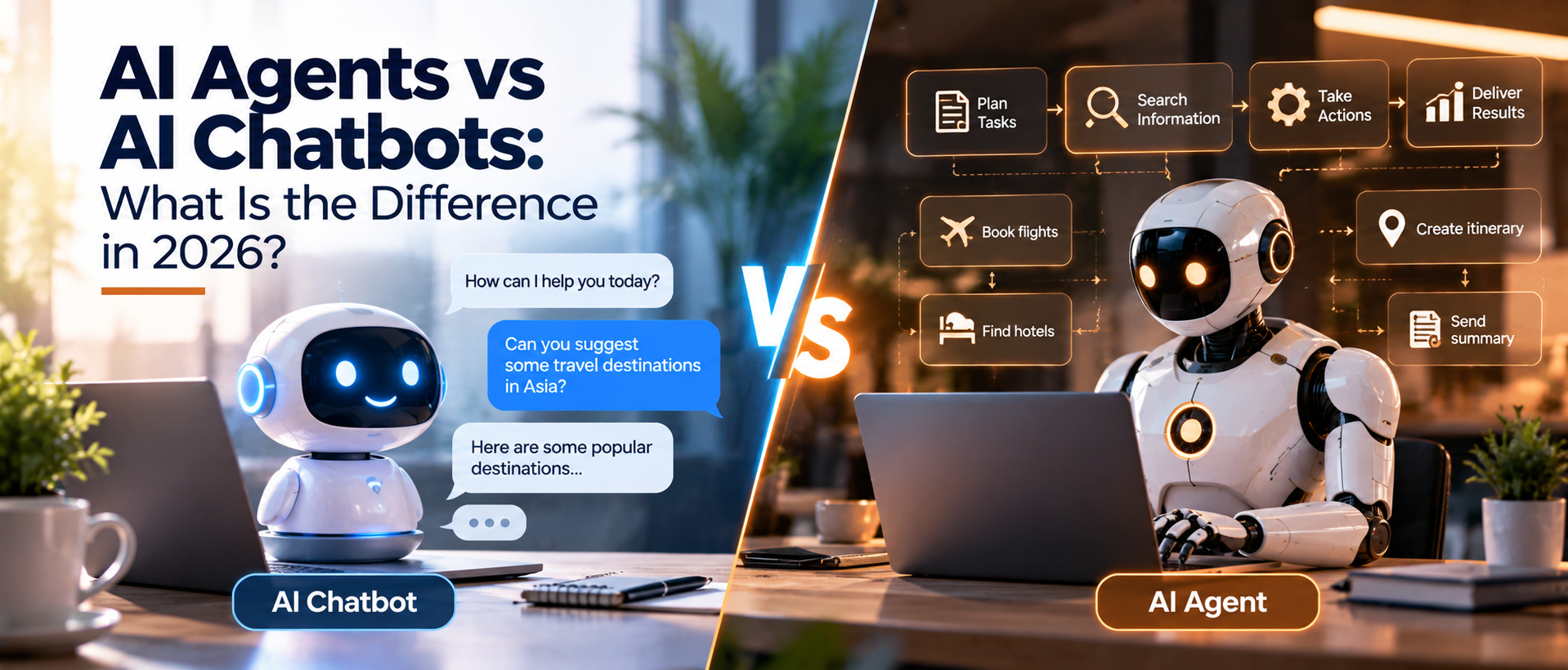
The distinction becomes clearer when you look at what each system is designed to do. An AI chatbot primarily helps you interact with information. An AI agent can use information, tools, and a sequence of decisions to work towards a defined outcome.
In 2026, understanding that difference can help businesses invest in the right technology, automate suitable tasks, and avoid expecting AI to deliver more autonomy than a system can safely support.
What Is an AI Chatbot?
An AI chatbot is a software application that communicates with users through a conversational interface. It receives questions or instructions and generates responses, helping people find information, understand a topic, or complete straightforward interactions.
Traditional chatbots often relied on predefined rules, decision trees, and scripted responses. A customer might select an option from a menu, follow a set of instructions, and receive an answer from a fixed knowledge base.
Modern AI chatbots are more flexible. Many use large language models (LLMs) to understand natural language, interpret context, summarise documents, draft content, and respond to questions that were not anticipated word for word.
For example, a customer might ask an AI chatbot about a company’s refund policy. The chatbot can explain the rules, clarify the conditions, and help the customer understand the next steps.
However, explaining a refund policy is not the same as processing a refund. Unless the chatbot has suitable integrations and permission to act, a person may still need to complete the transaction.
This distinction matters because not every chatbot is limited to scripted answers, and not every system that uses a conversational interface is an autonomous agent.
What Is an AI Agent?
An AI agent is a system designed to work towards a goal by selecting actions, using available tools, evaluating results, and deciding what to do next within defined boundaries.
Rather than simply generating a response, an agent can manage a sequence of operations. Depending on its configuration, it may retrieve information from business systems, analyse data, call APIs, create documents, update records, or coordinate with other software components.
OpenAI’s practical guide to building AI agents describes agents as systems that independently accomplish tasks on a user’s behalf. The guide emphasises two important characteristics: the model helps manage workflow execution, and the system can use tools to gather context and take actions within established guardrails.
Consider a sales team that wants to prepare for an important client meeting.
A chatbot could suggest questions to ask, summarise information pasted into the conversation, or draft a meeting agenda. An appropriately configured AI agent could go further by retrieving authorised customer records, reviewing recent interactions, preparing a briefing document, and saving the draft in a connected workspace.
The agent’s actual capabilities depend on its integrations, permissions, instructions, and reliability. It cannot access systems it has not been connected to, and it should not be assumed to complete every action without human review.
The essential difference is that an agent can participate in the execution of a workflow, rather than stopping at a conversational response.
AI Agents vs AI Chatbots: The Key Differences
Although the two technologies overlap, several characteristics help distinguish them.
| Feature | AI Chatbot | AI Agent |
| Primary purpose | Answer questions and support conversations | Work towards a goal and complete tasks |
| Typical interaction | Responds to a user prompt | Can plan and execute multiple steps |
| Tool access | May be limited to information retrieval or specific integrations | Can select and use configured tools to advance a workflow |
| Decision-making | Usually focuses on generating a response or following a defined flow | Can evaluate intermediate results and decide what to do next |
| Workflow execution | Often hands the next action back to the user | Can perform authorised actions across connected systems |
| Human involvement | User typically directs the conversation and acts on the response | Human oversight can be applied at selected checkpoints |
| Common applications | FAQs, conversational support, drafting, information lookup | Research workflows, multi-step support resolution, data processing, operational automation |
| Main implementation challenge | Response quality, accuracy, and relevant context | Reliability, permissions, tool integration, monitoring, and safe execution |
These are useful distinctions rather than rigid categories. A modern chatbot may have tool access, while an agent may be designed to ask for human approval at several stages.
The important question is not what a vendor calls the product. It is whether the system can plan and execute actions towards a goal, and how much independence it has in doing so.
How the Difference Works in Practice
The easiest way to understand the distinction is to compare how each technology handles the same business problem.
Example 1: Customer Service
Imagine a customer contacts an online retailer because an order has not arrived.
A chatbot can explain the delivery policy, answer common questions, and direct the customer to the order-tracking page. If connected to an appropriate knowledge base, it can provide a more personalised answer.
An AI agent could retrieve the order status, check authorised tracking information, determine whether the shipment meets the conditions for escalation, and create a support ticket or initiate an approved resolution.
The agent might still need a human to approve a refund or exception. Its role is to move the case towards resolution rather than simply explain the available options.
Example 2: Marketing Campaigns
A marketing chatbot can help a team brainstorm campaign concepts, draft social media captions, suggest email subject lines, or explain performance metrics provided by the user.
An AI agent connected to approved marketing systems could retrieve campaign data, compare performance against targets, identify unusual changes, prepare a report, and draft recommendations for the next campaign.
With the appropriate permissions and safeguards, it might also prepare campaign updates for approval. Publishing changes, increasing advertising spend, or contacting customers should be governed by explicit authorisation and suitable controls.
This is where agents can become particularly useful: they can reduce the number of manual steps required to turn analysis into action.
Example 3: Data Analysis
A chatbot can explain how to calculate customer acquisition cost or help write a SQL query. It can also analyse data when a file or dataset is provided and the required analytical capabilities are available.
An agent could potentially retrieve authorised data from several sources, run the required calculations, validate intermediate results, create charts, and prepare a recurring report.
The distinction is not that chatbots cannot analyse data. It is that agents can orchestrate a series of connected operations towards a defined outcome, provided the necessary tools are available.
Example 4: Software Development
A coding chatbot can explain a programming error, suggest a fix, or generate a function.
A coding agent can work within a configured development environment, inspect relevant files, modify code, run tests, interpret failures, and revise its changes. Depending on its permissions and workflow, it may also prepare a change for review.
The agent still needs appropriate safeguards. Generated code can introduce bugs, tests can miss problems, and changes to production systems can have serious consequences. Human review remains important for sensitive or high-impact work.
How AI Agents Actually Work
An AI agent is not simply a chatbot with a more impressive name. It combines a language model or other decision-making component with tools, instructions, and an execution process.
A typical agent workflow involves several stages.
1. Define the goal. The system receives an objective, such as preparing a weekly sales report or resolving an eligible customer support request.
2. Gather relevant context. It retrieves information from authorised sources, which may include databases, documents, APIs, or business applications.
3. Plan the next steps. Based on the goal and available information, it determines which actions are needed. Complex tasks may require breaking the objective into smaller steps.
4. Use tools and execute actions. The agent calls configured tools to search records, perform calculations, generate files, or interact with connected systems.
5. Evaluate the results. It checks intermediate outputs and determines whether more work is needed, whether an error occurred, or whether the task is complete.
6. Finish, escalate, or request approval. The system returns its result, asks a person to approve a consequential action, or transfers control when it cannot proceed safely.
This cycle may repeat several times. Some agents operate within a short, predefined workflow, while others can handle more complex tasks or coordinate multiple specialised agents.
Not every system uses all these stages, and an agent’s ability to recover from errors depends on its design. Giving an AI model access to tools does not automatically make the overall workflow dependable.
What Has Changed in 2026?
AI agents are not entirely new, but the technology ecosystem supporting them is developing rapidly. Improvements in language models, tool calling, orchestration frameworks, and connections to business software are making it easier to build systems that do more than generate text.
Several developments are shaping how organisations approach agents in 2026.
From Conversational Assistance to Task Completion
Businesses increasingly want AI to help complete work, not just explain how to do it. This has encouraged the development of agents that can coordinate multiple steps across applications.
Instead of asking an employee to copy information between systems, prepare a report, and draft an email manually, an appropriately configured agent may handle much of that process and present the result for review.
The greatest potential benefit often comes from reducing the handoffs between individual tasks.
Better Integration With Business Tools
Agents are only as useful as the systems and information they can access. Modern development platforms increasingly support connections to APIs, databases, file systems, and other software tools.
OpenAI’s agent development documentation describes approaches for building agents that use tools, maintain context, manage multi-step tasks, and hand work between components.
These capabilities make it possible to design workflows around real business processes rather than isolated conversations.
However, integration requires more than connecting an account. Businesses need appropriate permissions, reliable data, well-defined actions, and controls to prevent an agent from doing something it should not.
More Attention to Security and Interoperability
As agents gain the ability to act across systems, the consequences of errors or unauthorised actions become more significant.
In February 2026, the US National Institute of Standards and Technology announced its AI Agent Standards Initiative. The initiative focuses on supporting secure, interoperable agent ecosystems, including work on agent standards and security.
This reflects a central challenge for businesses: an agent must not only produce useful results but also operate within a clear framework of identity, permissions, accountability, and monitoring.
Human Oversight Remains Important
Greater autonomy does not mean that every task should be delegated without supervision.
A system might be suitable for automatically preparing an internal report but require approval before sending an external email, changing financial records, or issuing a refund. The appropriate level of oversight depends on the consequences of an error and the reliability of the workflow.
The objective is to automate suitable work while retaining meaningful human control over decisions that require judgement or carry significant risk.
The Business Benefits of AI Agents
When implemented well, AI agents can create value in several areas.
Reduced manual work. Agents can handle repetitive sequences of tasks, such as retrieving information, checking records, formatting reports, and preparing drafts.
Faster workflows. Tasks that previously required several manual handoffs may be completed more quickly when an agent can coordinate the necessary steps.
More consistent processes. A properly configured agent can follow defined procedures, apply standard checks, and produce outputs in a repeatable format.
Improved use of business information. Agents can retrieve and combine authorised information from multiple sources, helping employees work with data that would otherwise require manual collection.
More scalable operations. Organisations may be able to process greater volumes of routine work without increasing headcount at the same rate, although the actual benefits depend on the workflow and implementation costs.
These are potential benefits, not guaranteed outcomes. Agents can also introduce new costs through model usage, integration work, monitoring, exception handling, and human review.
Businesses should measure whether the technology improves the entire process, rather than assuming that automating one step automatically makes the operation more efficient.
What Are the Risks of AI Agents?
The same capabilities that make agents useful also create additional risks.
Incorrect Decisions and Actions
An agent can misinterpret instructions, use incomplete information, or select an inappropriate action. If it has permission to change records or trigger transactions, an incorrect decision can have consequences beyond an inaccurate answer.
Testing, validation, action limits, and approval checkpoints help reduce this risk.
Excessive Permissions
An agent should not receive unrestricted access simply because broader access makes implementation easier. Permissions should be limited to the data and actions required for its specific role.
For example, an agent preparing sales reports may need read access to sales records but should not automatically have permission to modify pricing or approve payments.
Data Privacy and Confidentiality
Agents may interact with customer records, internal documents, or other sensitive business information. Organisations need to control what data is accessible, how it is processed, where outputs are stored, and who can review them.
Data access should be governed by the same care applied to other business systems, with additional attention to how agent workflows transmit information between tools.
Prompt Injection and Tool Misuse
Agents that retrieve external content can encounter instructions embedded in documents, webpages, emails, or other untrusted sources. Those instructions may attempt to redirect the agent or persuade it to disclose information or misuse its tools.
Secure implementations need to separate trusted instructions from untrusted content, restrict tool permissions, validate important actions, and monitor unusual behaviour.
Unclear Accountability
When an agent makes a mistake, organisations need to know which system acted, what information it used, which permissions were available, and whether a person approved the action.
Audit logs, clear ownership, defined escalation procedures, and ongoing evaluation help establish accountability.
The more consequential the task, the more important these controls become. An agent that drafts a blog outline does not require the same risk management as one that handles financial transactions or modifies production systems.
When Should a Business Use a Chatbot Instead of an AI Agent?
AI agents receive considerable attention, but they are not automatically the best choice for every business problem.
A chatbot is often sufficient when the objective is to answer common questions, explain a policy, guide users through a simple process, or help employees find information.
For example, a company may use a chatbot to answer questions about office procedures, explain product specifications, or provide basic customer support. If the interaction ends when the user receives an accurate answer, adding a more autonomous agent may create unnecessary complexity.
An AI agent is more appropriate when the process requires multiple steps, interaction with several systems, and decisions about what to do next.
Examples include preparing recurring business reports, coordinating approved support workflows, gathering information from several authorised sources, and handling routine operational tasks that currently require repeated manual intervention.
Some businesses will benefit from a combination of both. A chatbot can provide the conversational interface, while an agent carries out selected actions behind the scenes. The user may see a simple conversation even though the system performs a more complex workflow.
The best architecture depends on the actual task, the cost of failure, and the level of autonomy the organisation needs.
How to Start Implementing AI Agents in a Business
A successful implementation begins with a well-defined business problem, not with a decision to adopt agentic AI simply because it is a prominent technology trend.
Identify a Repetitive, Bounded Workflow
Look for processes that involve recurring steps, predictable information sources, and measurable outcomes. Examples include preparing internal reports, classifying support requests, collecting information for sales briefings, or checking records for inconsistencies.
Avoid starting with an open-ended process that involves many high-impact decisions and unclear responsibilities.
Map the Existing Process
Document the steps employees currently perform, the systems involved, the decisions required, and the points where human judgement is necessary.
This makes it easier to determine which steps can be automated, which should remain under human control, and where integration work will be required.
Establish Permissions and Guardrails
Define what the agent can read, create, change, and send. Use the minimum permissions necessary, set limits on consequential actions, and require human approval where appropriate.
The boundaries should be explicit rather than relying on instructions alone.
Test With Realistic Scenarios
Evaluate the agent using normal cases, unusual inputs, incomplete information, system failures, and attempts to misuse its tools.
Measure accuracy, completion rates, exception rates, processing time, cost, and the amount of human intervention required. Testing should also establish whether the agent can recognise when it cannot safely complete a task.
Pilot Before Expanding
Start with a limited group of users and a clearly defined scope. Review the results, investigate failures, and refine the workflow before extending access or increasing autonomy.
An agent that performs well in a controlled pilot may behave differently when exposed to larger volumes of data, more varied requests, or additional systems.
Calculate the Actual Return on Investment
Compare the cost of implementation and operation with measurable improvements in the existing process.
Include integration, model usage, monitoring, security, training, maintenance, and human review. A system that saves five minutes per task may still be uneconomical if it requires extensive manual checking or generates frequent errors.
The objective is not to maximise the number of tasks performed by AI. It is to improve business outcomes at an acceptable level of risk and cost.
The Future of AI Agents and Chatbots
The boundary between chatbots and AI agents will continue to blur as conversational systems gain access to more tools and workflow capabilities. Some products that began as chatbots will evolve into systems capable of completing actions, while agent-based applications will continue to use chat interfaces to communicate with people.
This means businesses should be cautious about choosing technology based on product labels alone. A product advertised as an AI agent may offer only limited automation, while a chatbot may already support useful actions through connected tools.
Evaluate what the system can actually do, how it handles errors, which permissions it needs, and whether its performance can be measured.
In the long term, the most useful AI systems may combine conversational assistance, structured automation, and more autonomous agent behaviour within the same business environment. Different tasks will require different levels of independence, and human oversight will remain essential where decisions have significant consequences.
Final Thoughts
AI chatbots and AI agents serve related but distinct purposes. Chatbots make information and assistance easier to access through natural conversation. Agents extend those capabilities by using tools, managing multi-step workflows, and taking authorised actions towards a goal.
For businesses in 2026, the opportunity lies in matching the technology to the work. A chatbot may be all that is needed to answer customer questions. An agent may be worthwhile when a task involves several connected operations that consume time and can be completed safely under defined rules.
Start with the problem, measure the potential benefit, and establish appropriate controls before increasing autonomy.
The real value of AI is not how independently a system can operate. It is how reliably it helps people achieve a meaningful outcome.